Craft
Lightroom Classic Color Profile Issue with Sony A1 II: A Silent Fix in Version 14.5

Photographers using the Sony A1 II encountered a frustrating issue with Adobe Lightroom Classic versions 14.2 through 14.4, where RAW files displayed incorrect colors, particularly desaturated blues, cyans, and reds, with an overall hue shift. This problem, widely reported across forums like Reddit and Adobe’s Community, affected the editing workflow for many professionals, especially those requiring precise color accuracy. Despite the outcry, Adobe never officially acknowledged the issue, leaving users to find workarounds. Thankfully, Lightroom Classic 14.5 quietly resolved the problem, but with a catch for existing catalogs.
The Issue: Washed-Out Colors in Lightroom Classic 14.2–14.4
Starting with Lightroom Classic 14.2, users noticed that RAW files from the Sony A1 II (ILCE-1M2) appeared desaturated and exhibited unnatural color shifts when using the Adobe Color or Adobe Standard profiles. Blues turned petrol-like, greens appeared muted or brownish, and reds lost vibrancy, making it nearly impossible to match the color output of other Sony cameras like the A9 III or A7R V. The issue was particularly evident in the Develop module, where thumbnails initially displayed correct colors but shifted to a desaturated, weird hue upon loading the photo into develop module.

The problem persisted through versions 14.3 and 14.4, frustrating photographers who rely on consistent color rendering. Users reported that the issue was specific to the Sony A1 II, as other Sony cameras processed correctly under the same conditions. Workarounds included:
- Downgrading to Lightroom 14.1: This version, with preliminary support for the A1 II, rendered colors accurately.
- Converting RAW to DNG in Lightroom 14.1: Converting files to DNG before editing in Photoshop preserved correct colors, though this added an extra step.
- Using a ColorChecker: Some users calibrated their images with a ColorChecker to manually correct the color shifts, but this was time-consuming.
- Switching Profiles: Copy the profile from Lightroom 14.1 into the installation folder of Lightroom 14.2-14.4 overwriting the faulty profile.
Despite numerous reports on Adobe’s forums, Reddit, and other platforms, Adobe’s silence on the matter left users feeling ignored. Posts from March to July 2025 on Adobe’s Community forum documented the issue’s persistence.
The Silent Fix in Lightroom Classic 14.5
On August 13, 2025, Adobe released Lightroom Classic 14.5, which included a fix for the Sony A1 II color profile issue, though it was not explicitly mentioned in the release notes. The Adobe Color profile in 14.5 now matches the accuracy of profiles used for other Sony cameras, such as the A9 III. However, Adobe’s failure to acknowledge the issue or the fix in their official documentation left many unaware of the resolution.
For users who had imported photos in versions 14.2–14.4, there’s an additional step to restore correct colors. The problematic Adobe Standard v1 profile applied in earlier versions persists in existing catalogs. To fix this, users must:
- Open the affected photo in the Develop module in Lightroom Classic 14.5.
- Click the Reset button to clear all edits, including the faulty color profile.
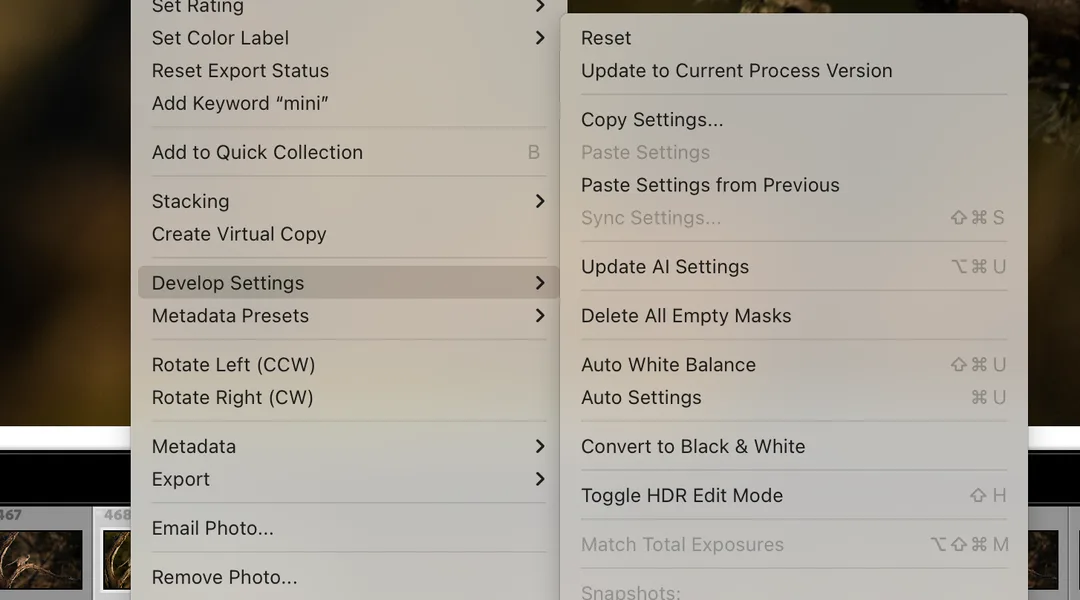
This process is necessary for each affected image, which can be daunting for photographers with thousands of affected photos.
Alternatively, in the Develop module, switch the color profile to any other option and then switch back to Adobe Color. This forces Lightroom to apply the Adobe Color v2 profile under the hood, which correctly renders colors. Note that while the interface may display “Adobe Color” the underlying .xmp file will reference Adobe Color v2 for corrected images.
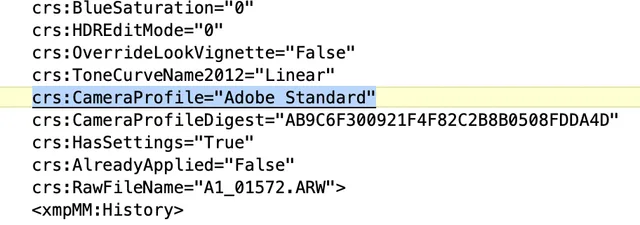
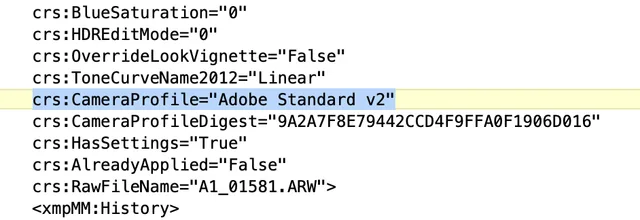
However, in Lightroom there is only an Adobe Standard profile; there’s no option to choose between v1 or v2. I wonder why they didn’t just fix the v1 profile instead of adding a v2 for the Sony A1 II.
The Frustration of Adobe’s Silence
Adobe’s lack of acknowledgment throughout the issue’s lifespan, from March to August 2025, was very frustating. The introduction of an Adobe Standard v2 profile in 14.5, rather than updating the existing Adobe Color profile, also created compatibility issues for presets, requiring users to update or recreate them.
Recommendations for Sony A1 II Users
If you’re a Sony A1 II user, this is how to address the color profile issue:
- Update to Lightroom Classic 14.5: This version resolves the color rendering issue for Sony A1 II RAW files.
- Reset Affected Images: For photos edited in versions 14.2–14.4, reset edits in the Develop module and reapply the Adobe Color or Adobe Standard v2 profile.
- Update Presets: If your presets rely on the Adobe Standard v1 profile, modify them to use Adobe Standard v2 or Adobe Color to avoid future issues.
Conclusion
The Sony A1 II color profile issue in Lightroom Classic 14.2–14.4 disrupted the workflows of professional photographers, requiring cumbersome workarounds and compromising color accuracy. While Lightroom Classic 14.5 quietly fixed the issue, Adobe’s lack of acknowledgment and the need to manually reset affected images have left a sour taste. Sony A1 II users should update to 14.5, reset affected photos, and update their presets to restore accurate colors. Moving forward, Adobe must communicate more openly to support its professional community effectively.