Tech & Building
Sometimes It's Worth Writing Things Down
A few weeks ago, I wrote about how I seem to be constantly looking for new problems to solve with software. One of those ideas was a tool to create and edit Sony camera settings files (CAMSET) directly on a computer, instead of having to navigate all those menus on the camera itself.
The idea actually came after my wife called me from Mana Pools in Zimbabwe, where she was leading a photography tour. She had some questions about the pre-capture settings on the Sony A1 II. Trying to navigate the camera menus from memory and explain over the phone what she needed to change turned out to be quite difficult, haha.
After we hung up, I started thinking that it would be much easier if I could just create a CAMSET file on my computer and send it to her. She could then just load the file on to the mem card and then update the camera, and all the settings would be there.
So, naturally, I started playing around with the idea the same evening. I spent a few hours experimenting and actually got far enough that I could modify a CAMSET file on my computer and load the changes back into the camera. The real challenge, however, was mapping all the individual settings in the file. That's where most of the work would be, not that it was difficult, just boring and time consuming to make a change in the camera, save the CAMSET file, copy to the computer let Claude analyze the change, and save the mapping discovered.
Shortly after publishing that blog post, I received an email from a guy who had found it. I assume he was Googling and researching Sony CAMSET files when he came across my blog.
As it turned out, he was also working on the same idea and suggested we could exchange ideas and information.
But he was already much further along than I was, so I didn't really have much to contribute. And with all my other projects keeping me busy, I was quite happy to leave this one to him.
One of those other projects is my own photo editor, which I'm building with the intention of eventually replacing Lightroom for my own photography. I work on it when I have time, and lately I've been spending quite a bit of that time on AI integration.
I've built an AI chat interface with MCP support, allowing an AI agent to make actual edits to photos. I can tell it what I want, whether that's adjusting white balance, changing the color grading, cropping an image, creating masks or making selective adjustments, and the agent does the work in the editor.
And to be clear, I'm not talking about generative AI creating or replacing parts of an image. These are real photographic edits, just like moving sliders and working with masks yourself. The difference is that I can describe what I want instead of manually making every adjustment. It works very well already.
Of course, I always knew Adobe will get there too. It's just a matter of time. In fact, it was interesting to see the announcements from Adobe MAX yesterday, where they demonstrated how external AI agents can connect to Creative Cloud applications through MCP and make edits directly in the software.
Pretty much the same direction I've been taking with my own editor.
I actually have something else working in my agent-based editing system that I haven't seen anyone else combine with this approach yet. But I'll keep that part to myself for now. :)
Anyway, back to the Sony camera settings tool.
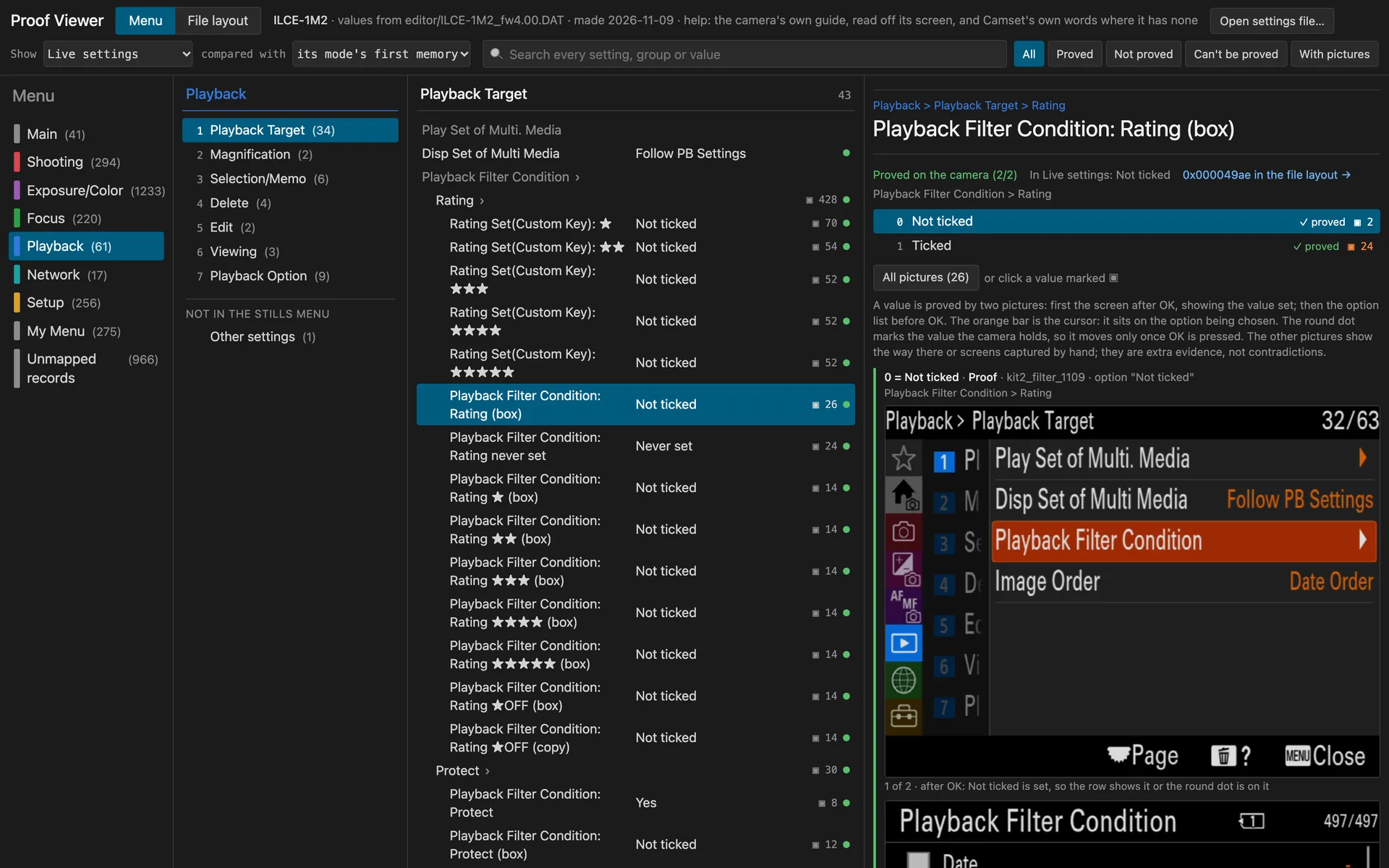
Fast forward to this morning. Another email, this time with a link to his GitHub repository. He had finished and published the first version! I tried it this morning. And it's good. Really good, especially considering it's the first version. He has taken the idea much much further than I ever imagined the final app.
You can read, edit and compare Sony CAMSET files on your computer, and there's even a system for mapping the settings of additional camera models. The project currently includes a verified definition for the Sony A1 II running firmware 4.00, which happens to be a camera I own.
The project is called Camset, and you can find it on GitHub: https://github.com/camset-dev/camset
I also wanted to write this post to give his work a little exposure. He deserves the credit for actually building it.
But the whole thing made me think a little about why I keep writing this blog.
I've never really had a specific purpose for it. It's mostly a place where I dump my thoughts, document things I'm working on, or write about something that happens to interest me that day. Sometimes photography, sometimes AI, sometimes business, and quite often some strange software project I've decided to start.
I don't write with any particular audience in mind, it's just something i enjoy to do, I would write even if nobody reads it.
Yet, over the years, the blog has connected me with quite a few people I would otherwise never have come across. People who share an interest, have worked on something similar, or simply have something interesting to add.
Not that we necessarily become friends or anything. Sometimes it's just a few emails back and forth.
But without that blog post, I probably wouldn't have known about this Camset project. I might even have spent a considerable amount of time trying to build my own version, while someone else was already doing a perfectly good job of it.
Instead, I got a nice email this morning and a new app to play with.
A note on AIThe thoughts and opinions here are my own. English isn’t my first language, so I sometimes use AI to help me say it better. More about how I use AI