Craft
I May Actually Replace Lightroom. So Now I'm Building My Own AI Denoise.
When I started building what eventually became FocusRAW Pro, I wasn't entirely sure how far I would take it. The whole thing started with an offloading problem…
When I started building what eventually became FocusRAW Pro, I wasn't entirely sure how far I would take it. The whole thing started with an offloading problem during my trip to Zimanga in August as i wrote about before, and somehow grew into an attempt to build my own Lightroom replacement.
But something has changed over the past few days. FocusRAW Pro is getting good. Good enough that I'm now seriously considering replacing Lightroom with it for my own photography. Not sometime in the distant future, but actually using it as my main RAW editor.
And that creates a few problems.
One of them is Denoise. If I'm going to replace Lightroom, the last thing I want is to open Lightroom just to denoise a photograph, export it and bring it back into FocusRAW Develop. That would rather defeat the purpose of building my own editor in the first place.
So I decided we needed our own Denoise model.
There's also a second reason, perhaps a slightly less rational one. I'm probably crazy enough to think I can actually do it better than Adobe for my personal use case, especially with what AI makes possible today. Whether that's true remains to be seen, but I want to find out.
Starting with the RAW sensor data
For my wildlife photography, noise reduction is particularly important. I'm often shooting with long lenses in poor light, trying to keep the shutter speed high enough to freeze an animal's movement. ISO 12,800 isn't particularly unusual, and sometimes I need to go higher.
But I've never been interested in removing every trace of noise if it means losing the fine detail. As a primary black and white photographer i usually even add grain in the process.
But in feathers, individual hairs in an animal's fur, the texture around a leopard's eyes. That's where I want the detail to survive.
One of our first technical decisions was to perform noise reduction directly on the RAW sensor data, before demosaicing, rather than on an already rendered RGB image.
The pipeline looks approximately like this:
RAW sensor data → AI noise correction → Demosaicing → Camera colour profile → Normal editing
A camera sensor doesn't capture complete RGB information at every photosite. On a typical Bayer sensor, each photosite records one colour component, and demosaicing reconstructs the full-colour image.
Our neural network works before that reconstruction. Once the AI correction has been applied, the result continues through FocusRAW's existing processing pipeline, including white balance, camera profiles and lens corrections.
We're also making the correction camera-aware. Different sensors produce different noise characteristics, and ISO 12,800 on one camera is not necessarily the same as on another. The current implementation uses matching camera noise profiles, ISO information and sensor black and white levels when preparing the data.
For now, we're restricting support to camera formats and decoding paths we've actually verified. There are enough variables in RAW processing already without pretending every camera works identically.
The expensive part only needs to happen once
This is probably the part of the implementation I find most interesting.
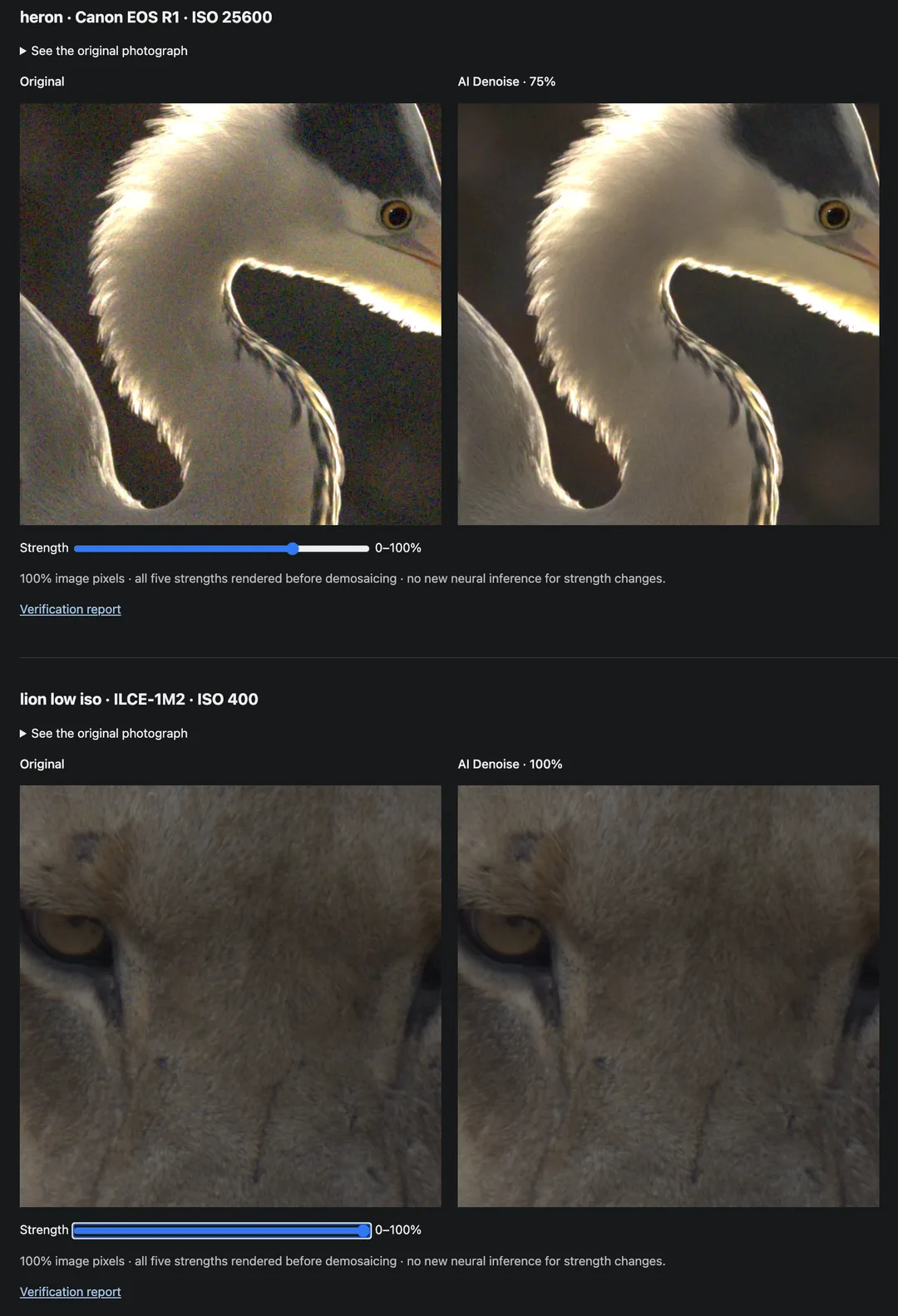
Running a neural network on a 50-megapixel RAW photograph takes time. But I don't want to wait for another neural-network inference every time I move the denoise strength slider from 50% to 60%.
So we're separating the AI calculation from the actual application of the correction.
The model calculates a full-resolution correction to the original sensor data, which we then cache. Changing the strength simply adjusts how much of that correction is applied to the original RAW.
Conceptually:
Adjusted RAW = Original RAW + (Strength × AI correction)
At 0%, the original data is used. At 100%, the full correction is applied. Everything in between can be adjusted without running the neural network again.
We currently default to 50%, and testing has already shown why I want that control.
On a low-noise test photograph, maximum strength actually started smoothing some of the fine fur detail. The image looked cleaner, certainly, but that's not necessarily what I want. There's a point where removing more noise starts removing the detail I was trying to preserve.
It's also why I don't particularly like the idea of AI Denoise being a simple on/off operation. I want to decide how much correction each photograph needs.
The first performance numbers
The implementation runs locally using the Apple GPU. Once the model and runtime are installed, there's no need to upload images to a cloud service.
Larger photographs are processed in tiles with surrounding context, so the model has information beyond the exact area it's processing. This is important to avoid visible differences along the boundaries between tiles.
We've also had to think about how this works while I'm actually editing. The Develop module still needs to respond while AI Denoise is running. Processing happens in the background, with progress reporting and cancellation, and the GPU work is coordinated so foreground rendering can run between inference tiles.
For our first full Develop acceptance test, we used a Sony A1 II 50-megapixel RAW photograph taken at ISO 12,800, running on my Mac Studio M3 Ultra with 256 GB of unified memory.
Here are the actual measurements:
Operation | Time |
Preparing the full AI correction | 16.2 seconds |
Strength adjustment and native decoding | 0.59 seconds |
Foreground preview during inference | 0.15 seconds |
Cancellation during the test | 0.32 seconds |
These are measurements from one acceptance run on my development machine, not benchmarks across different Macs or camera models.
Still, 16.2 seconds to prepare the correction for a 50-megapixel photograph is something I can work with. Particularly when I can subsequently change the strength and decode the image again in around 0.6 seconds.
And I'm planning a rather substantial hardware upgrade. As soon as Apple opens preorders for the M5 Ultra Mac Studio with 512 GB of unified memory, I'll be hitting the buy button.
I expect that machine to bring the processing time down significantly, although I'll have to run the same tests before I know by how much. The additional memory will also give me more room for larger models and experiments. My current M3 Ultra is already a very capable machine, but I'm increasingly finding things to throw at it that I hadn't imagined when I bought it.
What if I use the entire burst to reduce noise?
There's another idea we're experimenting with, and this one comes directly from how I photograph wildlife.
When I'm photographing an animal in action, I often shoot bursts at 30–40 frames per second. That means I can end up with quite a few RAW photographs taken only fractions of a second apart.
Think about what those photographs contain. The background might be almost identical in every frame. The animal may have moved a little, but large parts of the scene haven't changed. The sensor noise, however, is different in each exposure.
In theory, that gives us more information than a single RAW file.
If we can align the photographs accurately enough, we should be able to use information from multiple exposures to estimate the underlying image signal more accurately and separate it from the random noise.
Of course, the animal doesn't necessarily cooperate. A leopard turning its head, feathers moving, a branch crossing the frame or simply shooting handheld with a long lens will complicate the alignment. I certainly don't want to produce an image where the background looks fantastic but the animal has acquired some strange artificial texture because we combined frames incorrectly.
One possibility is to use the neighbouring photographs as additional information while preserving one selected frame as the actual photograph. Perhaps some regions can benefit from multiple frames while others need to rely on the original exposure.
This is experimental for now. We haven't established that it will work well enough to become part of FocusRAW Pro, and I don't know yet how useful it will be with fast-moving subjects.
But I find the idea interesting. Wildlife photographers frequently generate enormous amounts of almost identical image data, and currently most of that information is discarded when we select the one photograph we want to edit.
Maybe some of it could be put to better use.
Almost one million RAW files to learn from
This also connects to something I wrote about the other day: hyper-personalized software.
I've increasingly come to believe that one of the more interesting things AI enables is software developed around the needs of a particular person, rather than a general-purpose application designed to satisfy millions of different users.
FocusRAW Pro is already an example of that. I'm building the RAW editor I want to use myself, for the kind of photography I actually do.
And why stop at the application itself?
I currently have almost one million RAW photographs in my library, all taken by me. Different cameras, ISO settings, lighting conditions, lenses, subjects and locations. Years of actual photography rather than a collection of generic test images.
That's a rather interesting resource if I want to experiment with training or fine-tuning a denoising model specifically for my photography.
Imagine a denoiser developed around the cameras I actually own, the ISO settings I frequently use and the kind of wildlife photographs I take. One where preserving the fine texture of fur and feathers matters more to me than producing the smoothest possible image.
Of course, having almost a million RAW files isn't the same as having a million ready-made training examples. We still need to work out how to produce reliable training data and evaluate whether a specialized model actually performs better. The burst idea might even provide useful information for that, if we can solve the alignment problems.
We're not there yet. The current implementation uses camera-aware noise profiles, but the idea of a model trained specifically around my own photography is something I want to explore.
It's also a different way of thinking about software development. Adobe needs to build a denoiser that works well for an enormous range of photographers and cameras. I don't necessarily have to solve that entire problem.
If I can make something that works exceptionally well for my own cameras and photographs, that's a perfectly good place to start.
Making it part of Develop
The first implementation already lives under Develop → Detail → Denoise, with a strength adjustment from 0–100%, bypass control and Before/After comparison.
It works with the normal undo and redo system, and the strength setting is saved alongside the other editing parameters.
The original RAW file remains untouched. We store the selected strength and a reference to the prepared AI correction, and the result is applied through the normal rendering pipeline when exporting.
One thing we've been careful about is what happens when something goes wrong.
If a cached correction is missing or invalid, FocusRAW reports that explicitly instead of silently producing an export without the noise reduction that was supposed to be applied.
We also verified that exporting at 0% strength produced a PNG that was byte-identical to our baseline export.
That might sound like a fairly boring test, but I think it's important. If I'm eventually going to trust this application with my photography, I need to know that it produces the result I asked for, including when an AI correction is disabled.
There's still plenty to do. The first RAW-to-AI-to-export workflow is functioning, but we need considerably more image-quality testing before I can seriously compare it with Adobe's denoising.
I haven't established that ours is better. I'm not even claiming it's close yet.
But now I have something working that I can experiment with. An AI correction that can be adjusted without running the neural network again, ideas about using entire bursts of photographs, and almost a million RAW files that might help me build something specifically for my own photography.
All because I don't want to open Lightroom just to denoise a photograph.
Next idea to explore this weekend, is denoise masks, eg different denoise strength applied to different parts of the image, think stronger on the background, weaker on the animals fur.
We live in interesting times.